---
updatedAt: 2026-06-21T11:30:58.000Z
agentTools:
projectIndex: https://developers.taboola.com/taboolasdk/v3/llms.txt
---
# Flutter Plugin
`Beta version`
### Deprecation Notice
You are viewing the **SDK v3** docs. **SDK v3 will be deprecated on September 30, 2026.**
We recommend upgrading to [**SDK v4**](https://developers.taboola.com/taboolasdk/docs/welcome) — the latest and actively maintained version. To get started, follow the [**SDK v3 → v4 Migration Guide**](https://developers.taboola.com/taboolasdk/docs/upgrading-from-sdk3-to-sdk4).
### You are viewing the **v0** docs. Note that [**v1**](https://developers.taboola.com/taboolasdk/docs/flutter-plugin) is now the *preferred* version.
> 📘 Example App
>
> Take a look at our Flutter example app on [github](https://github.com/taboola/taboola-flutter-example).
## Step 1: Dependencies & Permissions
### General
1. You can incorporate the **Taboola** package from the following pub.dev
```text
https://pub.dev/packages/taboola_sdk
```
2. In your project’s `pubspec.yaml`, under ‘dependencies:’, add:
```text
taboola_sdk: 0.3.0
```
3. Don't forget to turn off the Taboola logs before uploading your app to the Google Play / App Store
```text dart
Taboola.setLogsEnabled(true);
```
> 🚧 Running The Flutter App
>
> To run the Flutter app on versions 2.x and above, use the "--no-sound-null-safety" flag. For example: "flutter run --no-sound-null-safety"
### Android
Add permissions in your relevant `AndroidManifest.xml`, above the `` tag, add
```xml
```
### iOS
Add permissions in your relevant `Info.plist` add the following between the `` tags:
```xml
NSAppTransportSecurity
NSAllowsArbitraryLoads
NSAllowsArbitraryLoadsInWebContent
```
## Step 2: Init Taboola
> 🚧 Important note about using 'webview\_flutter' with Taboola
>
> * In case you are using the 'webview\_flutter' plugin and its default Platform Views rendering methods, please check if Taboola integration is causing you rendering issues.
> * Taboola Widget requires the Hybrid Composition rendering method and, unfortunately, the 'webview\_flutter' plugin requires switching render mode in a global way.
> * Our recommended approaches to this issue: Make sure to create all your WebViews before creating Taboola Widgets. 'webview\_flutter' plugin will keep your existing WebViews in their existing render methods and only change Taboola's WebViews to Hybrid Composition."
1. Import **Taboola** to your project
```java Dart
import 'package:taboola_sdk/taboola.dart';
```
2. Create a `PublisherInfo` object, passing your **Taboola** Publisher ID:
```java Dart
PublisherInfo publisherInfo = PublisherInfo();
```
> 📘
>
> `publisherId` - Your **Taboola** Publisher ID.
>
> > A unique, alphabetic string, **provided to you by Taboola**.
3. Execute the `init` function with the `PublisherInfo` object
```java Dart
Taboola.init(publisherInfo);
```
## Step 3: Add Taboola to the build stack
### Import the relevant components
```java Import
import 'package:taboola_sdk/classic/taboola_classic_listener.dart';
import 'package:taboola_sdk/classic/taboola_classic.dart';
import 'package:taboola_sdk/taboola.dart';
```
### Obtain a TaboolaStandard Instance
1. Get an instance builder
```java Get a TaboolaClassicBuilder
TaboolaClassicBuilder taboolaClassicBuilder = Taboola.getTaboolaClassicBuilder(
,
);
```
> 📘 Params
>
> * `pageUrl` - A public, fully-qualified URL that reflects the current screen's content.
> * `pageType` - The relevant page type, **as provided by Taboola**.
2. Add the Taboola unit
```java Build a TaboolaClassicUnit
TaboolaClassicUnit taboolaClassicUnit = taboolaClassicBuilder.build(
,
,
,
,
, // For a single unit, this param is optional
, // Optional (See 'Special cases')
// Optional (Used with ListView. Default = false)
);
```
> 📘 Params
>
> * `placement` - Your placement param, **as provided by Taboola**
> * `mode` - Your mode param, **as provided by Taboola**.
> * ` isFeed` - Determines which **Taboola** **unit** is returned:
> > * Pass `false` to obtain a **limited** `TaboolaWidget` for mid-page *or* page-bottom.
> > * Pass `true` to obtain **an unlimited** `TaboolaFeed` for page-bottom.
> * `TaboolaStandardListener` - You will create the `TaboolaStandardListener` in the next step.
> * `viewID` - A unique, numeric string (e.g. the current epoch timestamp).
> > * When adding *multiple* **Taboola** units to the same screen, pass the same `viewId` for each unit. See: [Multiple Taboola units on a screen](https://developers.taboola.com/taboolasdk/v3/docs/taboola-flutter-plugin#multiple-taboola-units-on-a-screen)
> > * If you have a *single* **Taboola** unit on the screen, this param is *optional*.
> * `scrollController` - (*Optional*) Your own ScrollController
> > * **When needed**, pass your own`ScrollController` - see below: **Special cases**
> > * If you do **not** pass a `ScrollController`, the **Taboola SDK** will create one, and expose it via the unit's `scrollController` property.
> > * A *limited* **Taboola unit** (*aka* `TaboolaWidget`) does **not** need a custom `ScrollController`.
> * `keepAlive` - (*Optional*) Allows you to persist **Taboola** units in a **`ListView`**.
> > * Default = `false`
> > * Pass `true` to ensure that the **Taboola** unit is *not* destroyed when scrolled *offscreen*.
> > * Otherwise, scrolling back creates a *new* **Taboola** unit. This will cause new recommendations to load, and may cause a **flickering** effect.
> 🚧 Special cases
>
> For the following special cases, refer to the instructions provided:
>
> * [ListView](https://developers.taboola.com/taboolasdk/v3/docs/taboola-flutter-plugin#listview)
> * [Multiple Taboola units on a screen](https://developers.taboola.com/taboolasdk/v3/docs/taboola-flutter-plugin#multiple-taboola-units-on-a-screen)
> * [Nested scrolling](https://developers.taboola.com/taboolasdk/v3/docs/taboola-flutter-plugin#nested-scrolling)
## Step 4: Set Callbacks
> 🚧 Important!
>
> Make sure to implement the `taboolaDidFailToLoad` method to handle the event of an error or no fill.
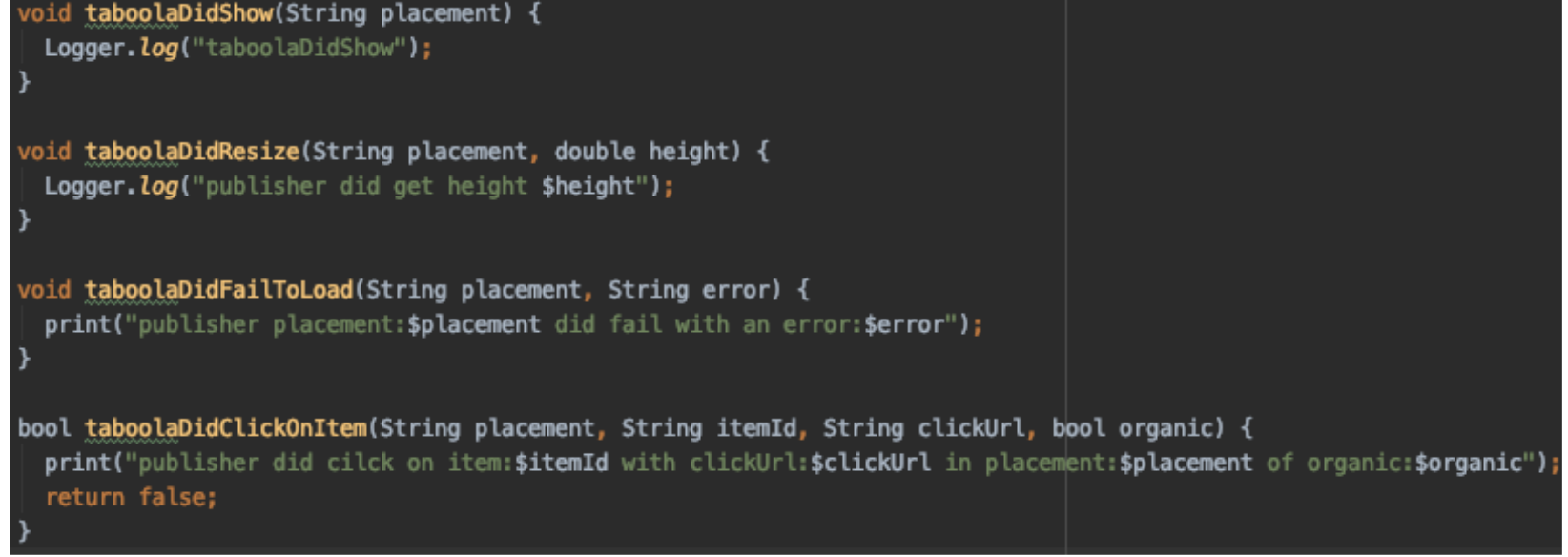
Create a `TaboolaStandardListener` object to receive callbacks regarding your TaboolaStandard instance:
```text Dart
TaboolaClassicListener taboolaClassicListener = TaboolaClassicListener(taboolaDidResize,taboolaDidShow,taboolaDidFailToLoad,taboolaDidClickOnItem);
```
### `taboolaDidResize`
This callback is called every time Taboola’s web content resizes.\
Params:
* Placement: The name of the Taboola Widget.
* Height: The min. between 1 screen size & current WebView height (wraps around its web content)
### `taboolaDidShow`
* Placement: The name of the Taboola Widget.
* General: This is called when Taboola web content starts rendering (on or off screen), treat this more like an onLoadSuccess()
### `taboolaDidFailToLoad`
Called when Taboola failed to display content or timed out.\
Params:
* Placement: The name of the Taboola Widget.
* Error: The error message related.
### `taboolaDidClickOnItem`
This callback will be called when a user clicks on a Taboola item. (String placement, String itemId, String clickUrl, bool organic)\
Params:
* Placement: The name of the Taboola Widget.
* ItemId: The id of the item clicked.
* ClickUrl: The url of the item clicked.
* Organic: True if the clicked item is organic, false if it’s sponsored.\
Return value:\
This callback also implements logic regarding who handles the user click. If you return true: Taboola will handle the click automatically. If you return false: In case of organic item/article, you will be able to handle the click yourself. Sponsored items will still be handled by Taboola at any case.
**TaboolaStandardListener expects Functions as arguments**
## Step 5: Submit your app for review
You're done!\
When you have finished the integration, contact your account manager and send a debuggable version of your Android and iOS projects. Reach out to your Taboola contact for more information
## Special Cases
### ListView
> 🚧 Guidelines
>
> When using a `ListView`, make sure to:
>
> 1. Pass **your own** `ScrollController` to **Taboola**.
> 2. Set the `keepAlive` flag to `true`.
>
> ***
>
> Detailed steps are provided below.
1. Create **your own** `ScrollController` instance:
```java ScrollController instance
final ScrollController _scrollController = ScrollController();
```
2. When **building your`ListView`** , *reference* your `ScrollController`:
```java Building the ListView
body: ListView.builder(
controller: _scrollController, // A reference to your ScrollContoller
itemCount: items.length,
itemBuilder: (BuildContext context, int index) {
// Your ListItem UI code here...
},
),
```
3. When **building the`TaboolaClassicUnit` instance**, pass your own `ScrollController` and set the `keepAlive` flag to `true`:
```java Building the TaboolaClassicUnit instance
TaboolaClassicUnit taboolaClassicUnit = taboolaClassicBuilder.build(
,
,
,
,
,
yourScrollController, // Pass your own ScrollController
true // Pass true
);
```
***
> 📘
>
> See above: [Obtain a TaboolaStandard Instance](https://developers.taboola.com/taboolasdk/v3/docs/taboola-flutter-plugin#obtain-a-taboolastandard-instance)
### Multiple Taboola units on a screen
It is possible to add more than one Taboola unit on the same screen such as two widgets or mid article widget and bottom article feed.
To enable this functionality properly:
1. Set the same viewId value for each TaboolaClassicUnit object before rendering the widget. The viewId value\
must be a string of digits of maximum 19 characters. We recommend using the current epoch timestamp.
2. Fetch the content for the second asset only after a response is received for the first asset. Please use the\
'taboolaDidShow' callback of the 1st asset to initiate rendering for the 2nd unit.
3. Pass your own `ViewController`, as described for [ListView](https://developers.taboola.com/taboolasdk/v3/docs/taboola-flutter-plugin#listview) (above).
For full implementation details, see our [example app](https://github.com/taboola/taboola-flutter-example/blob/main/lib/pages/custom_scroll_view_page_feed_and_widget.dart).
### Nested scrolling
If you have your own custom ScrollController, please set it in the optional argument when building TaboolaStandard instance
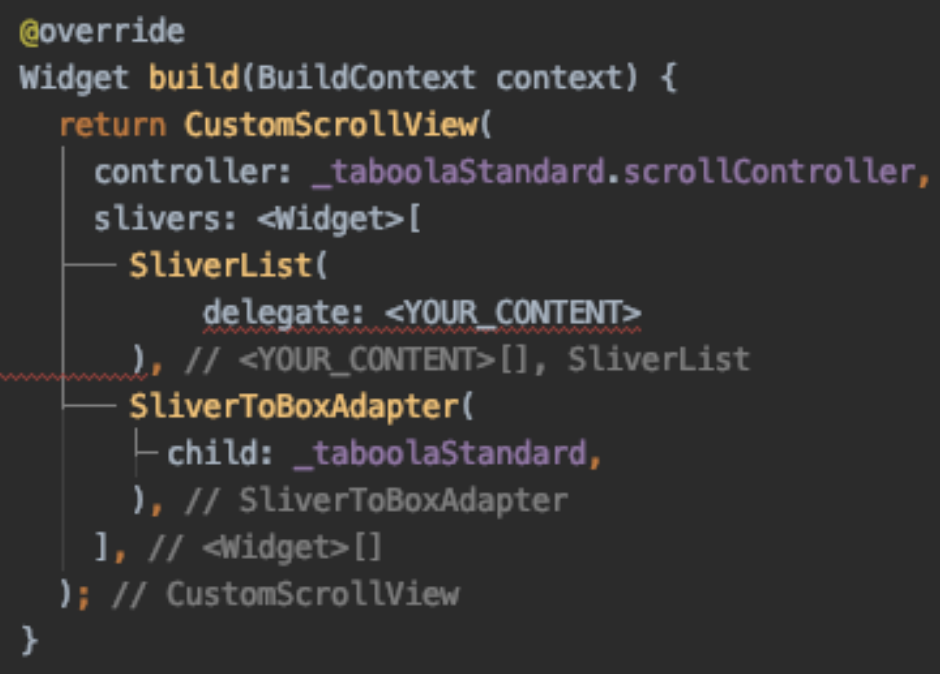
When adding “Taboola Feed” into a screen below a scrollable Widget. Taboola’s best-suggested practice is as followed:
1. Create a CustomScrollView
2. Set Taboola’s ScrollController as the CustomScrollView’s controller. This will allow Taboola to transfer scrolling between its Feed and your content.
3. Add your content into a SliverList.
4. Add your TaboolaStandard instance as a child of a SliverToBoxAdapter.\
If you have your own custom ScrollController, please set it in the optional argument when building TaboolaStandard instance
Code Samples:
```text dart
_taboolaClassic = taboolaClassicBuilder.build(placement, mode, true, _taboolaStandardListener, );
```
## GDPR & CCPA
Taboola Flutter plugin can get a direct signal for the current user about the GDPR and CCPA status.\
Currently, the plugin does not support the IAB CCPA, TCFv1, and TCFv2 frameworks
### GDPR
It is possible to forward the consent status to Taboola plugin on when using a dedicated flag - `cex.` The consent boolean value (in string format) should be passed on each session.\
By default, the value of this flag is set to "true" - allowing Taboola to use the user's data. Please use the flag only when the end-user is GDPR subject and set it to "true" (user-provided consent), or "false" (user didn't provide consent).
```text dart
HashMap extraProperties = new HashMap(); //map has to be of structure.
extraProperties.putIfAbsent("cex", () => "true"); //or “false”
Taboola.init(PublisherInfo(publisher), extraProperties: extraProperties);
```
### CCPA
It is possible to forward the CCPA "Do Not Sell" (dns) status to Taboola plugin on each time the widget/feed is initialized using a dedicated flag - `cdns`. The value (in string format) should be passed on each session.
* true - CCPA applies, and the end-user opted-out per CCPA requirements
* false - CCPA applies, and the end-user didn't opt-out per CCPA requirements
* none - CCPA does not apply (the default status)\
By default, the value of this flag is set to none - the end-user is not CCPA subject, allowing Taboola to use the user's data. It is recommended to place these lines alongside the other settings, such as publisher name, etc
```text dart
HashMap extraProperties = new HashMap(); //map has to be of structure.
extraProperties.putIfAbsent("cdns", () => "true"); //or “false”
Taboola.init(PublisherInfo(publisher), extraProperties: extraProperties);
```
### Dark Mode
> 🚧
>
> Dark mode is **not** supported by default. For dark-mode placements, contact your **Taboola Account Manager**.
Once **Taboola** has configured your dark-mode placements, you can use the following code in your application:
```text dart
HashMap extraProperties = new HashMap(); //map has to be of structure.
extraProperties.putIfAbsent("darkMode", () => "true"); //or “false” if you don't wish to recieve dark mode placements
Taboola.init(PublisherInfo(publisher), extraProperties: extraProperties)
```
## Test drive
You can use the following test parameters for your development efforts
| Parameter | Endless Feed | Widget |
| :------------ | :--------------------------- | :------------------------------------- |
| PublisherInfo | "sdk-tester-demo" | "sdk-tester-demo" |
| Placement | "Feed without video" | "Below Widget" |
| PageURL | "" | "" |
| PageType | "article" | "article" |
| TargetType | "mix" | "mix" |
| Mode | "thumbs-feed-01" | "alternating-widget-without-video-1x4" |
## Contact us & Terms
If you wish to integrate the Taboola Flutter package into any commercial applications, please make sure you have a green light from your Taboola contact and from Taboola Product team
Using this Flutter package is subject to [Taboola terms of use](https://policies.taboola.com/en/terms-of-use/) and [privacy policy](https://policies.taboola.com/en/privacy-policy/)